---
url: /blog-vue/vue-h-function-with-type-hints.md
description: 先前提到 Quasar 的 Dialog Plugin 很好用,再讓我補充一個用法。ლ(╹◡╹ლ)
---
{.cover}
# 所以我說那個型別呢?來一個有形別提示的 Vue h function 吧!
[先前提到](./blog-vue/vue-h-function-makes-quasar-dialog-easier-to-reuse) Quasar 的 Dialog Plugin 很好用,再讓我補充一個用法。
有時候會希望可以點擊圖片時將圖片最大化呈現,這個需求如果要簡單實現,可以使用 QDialog 實作。
最直接的做法應該是點擊指定圖片時,將圖片的 src 存起來,再將 dialog 的顯示狀態改為 true,讓 Dialog 開啟。
其實你可以直接使用 $q.dialog 配合 h function 簡單完成。
```vue
```
這樣就可以簡單快速的利用 Dialog 開啟圖片了,完全不會有額外的 template 與變數!♪( ◜ω◝و(و
::: tip
不過如果要複雜的互動,例如:縮放平移等等,當然還是要包個專用元件處理。
:::
當然不只有 QImg,想用其他元件也行,概念都一樣。◝( •ω• )◟
不過這裡稍微有個小小的困擾,就是 h function 不會提示元件的參數,給錯或是參數改了都不知道。…(›´ω\`‹ )
讓我們建立一個有元件參數提示的 h function 吧!(/≧▽≦)/
## 有形別提示的 h function
第一步是建立協助抽取 Vue 元件型別的實用 function。
::: tip 推薦官方工具
推薦使用官方的 [vue-component-type-helpers](https://www.npmjs.com/package/vue-component-type-helpers)
:::
`types/index.ts`
```ts
import { Slot } from 'vue'
/** 提取 Vue Component 之內部 props
*
* 會將 style、class、event 全部取出來
*/
export type ExtractComponentProps = Comp extends new () => {
$props: infer P;
}
? P
: never
/** 提取 Vue Component slots */
export type ExtractComponentSlots = Comp extends new (...args: any) => {
$slots?: infer S;
}
? (S extends Slot ? Parameters[0]
: {}
) : {}
```
接著新增 typedH function。
`common/utils.ts`
```ts
import { Component, h } from 'vue'
import { ExtractComponentProps, ExtractComponentSlots } from '../types'
/** 元件繼承參數
*
* [文件](https://cn.vuejs.org/guide/components/attrs.html#fallthrough-attributes)
*/
export interface InheritAttr {
class?: string;
style?: Record;
/** 為了讓範例精簡,這裡只列出 click,可以自行追加基礎事件 */
onClick?: (event: MouseEvent) => void;
}
/** Veu h function 有型別推導的版本
*
* [何謂 h function](https://cn.vuejs.org/guide/extras/render-function.html)
*
* @param component Vue SFC 元件或 html tag 名稱
* @param props SFC 內所有參數,包含 class、style、event 等等
* @param slots SFC 插槽
*/
export function typedH(
component: string,
props?: string,
): ReturnType
export function typedH(
component: string,
props?: InheritAttr,
slots?: ExtractComponentSlots,
): ReturnType
export function typedH(
component: Comp,
props?: ExtractComponentProps & InheritAttr,
slots?: ExtractComponentSlots,
): ReturnType
export function typedH(
component: any,
props?: any,
slots?: any,
) {
if (!slots) {
return h(component, props)
}
return h(component, props, slots)
}
```
用法與原本的 h function 一模一樣,現在我們有型別提示了!✧⁑。٩(ˊᗜˋ\*)و✧⁕。\*。
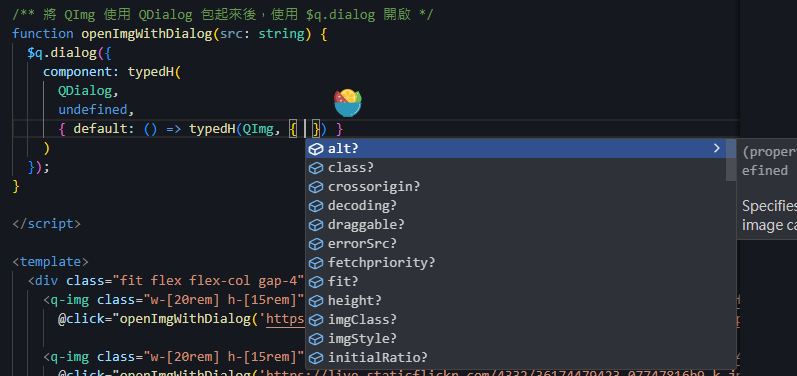
就這樣,其實也不是甚麼神奇的東西。(´,,•ω•,,)
[範例程式](https://stackblitz.com/~/github.com/Codfisher/blog-vue-typed-h)在此,大家下次見。( ´ ▽ \` )ノ
## 總結 🐟
* h function 快速將現有元件變成 Dialog 元件
* 透過 typedH function 可以有型別提示