---
url: /column-hexazen/01-origin.md
description: 同一個白噪音聽到快背起來了,來試試自己做一個 3D 白噪音混音器吧。◝(≧∀≦)◟
---
{.cover}
# HexaZen - EP01:前言
平常上班時耳機常常都是放白噪音、雨聲等等自然聲音。
同一個聲音聽太多次,連下一個雷聲甚麼時候出現我都快背起來了。%(›´ω\`‹ )%
雖然有很多不錯的線上混音器網站,但是總感覺差了一點甚麼。
這次想嘗試用 Babylon.js 做一個 3D 白噪音混音器,聲音使用隨機播放的形式呈現。
## 說明
做一個有趣的白噪音網站,同時練習更複雜的 3D 應用
### 概念
每個聲音都是一個積木,積木可以任意組合,積木種類與規模會產生不同自然音效。
例如:
* 草:無
* 樹木:風吹過樹葉聲音
* 雲:下雨聲音
* 房子:咖啡廳聲音
* 河:流水聲
不同規模會產生生態系,例如樹木夠多會有蟲鳴、鳥叫等等。
地圖資訊會儲存在 URL 中,分享連結即可讓其他人聽到你的設計的自然音效。
### 素材
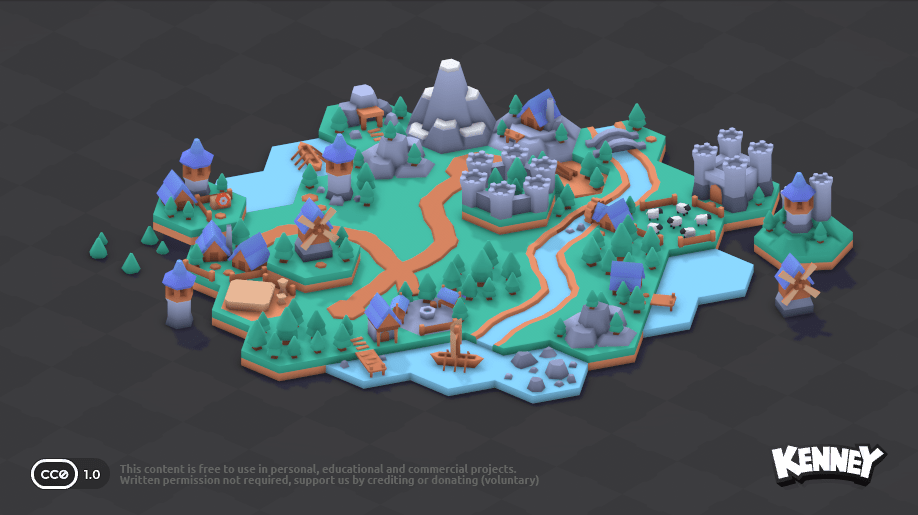
3D 積木則基於 kenney 大大設計的「[Hexagon Kit](https://kenney.nl/assets/hexagon-kit)」
感謝 kenney 大大提供如此優秀的素材!%(\*´∀\`)~♥%
## 開發
現在讓我們開始吧。%੭ ˙ᗜ˙ )੭%
第一步我打算先在此部落格做原型測試。
多虧 VitePress 強大的客製化能力,現在來建立完全客製化的頁面。
### 建立頁面
新增檔案。
`content\aquarium\hexazen\index.md`
```markdown
---
title: HexaZen
description: 組合多種場景並產生不同的自然音效
image: https://codlin.me/hexazen-cover.webp
layout: false
---
```
`layout` 設為 `false` 代表不使用預設的佈局,這樣就可以自由設計頁面了!%♪( ◜ω◝و(و%
::: tip
詳細說明可見文件:[VitePress:Layout](https://vitepress.dev/reference/default-theme-layout)
:::
現在導航到 `http://localhost:3000/aquarium/hexazen/` 應該會是一片空白。
接著在頁面中以 iframe 方式引入主元件,利用 [whyframe](https://whyframe.dev/) 隔離環境。
`content\aquarium\hexazen\index.md`
```markdown
---
title: HexaZen
description: 組合多種場景並產生不同的自然音效
image: https://codlin.me/hexazen-cover.webp
layout: false
---
```
使用 iframe 隔離可以避免 VitePress 本身的樣式和狀態干擾,讓 HexaZen 擁有完全獨立的運行環境。
### 場景初始化
由於 Babylon.js 場景最基本構成是 `engine`、`scene`、`camera`、`light`。
所以我將相關邏輯直接獨立為 `use-babylon-scene` composable,簡化元件內容。
`content\aquarium\hexazen\composables\use-babylon-scene.ts`
```typescript
export function useBabylonScene(param?: UseBabylonSceneParam) {
const canvasRef = ref()
const engine = shallowRef()
const scene = shallowRef()
const camera = shallowRef()
onMounted(async () => {
if (!canvasRef.value)
return
engine.value = await createEngine({
canvas: canvasRef.value,
})
scene.value = createScene({
canvas: canvasRef.value,
engine: engine.value,
})
camera.value = createCamera({
canvas: canvasRef.value,
engine: engine.value,
scene: scene.value,
})
engine.value.runRenderLoop(() => {
scene.value?.render()
})
await init({ canvas, engine, scene, camera })
})
onBeforeUnmount(() => {
engine.value?.dispose()
scene.value?.dispose()
})
return { canvasRef, engine, scene, camera }
}
```
支援 WebGPU 優先、WebGL 降級的引擎建立策略,並提供預設的場景、攝影機、光源設定,同時允許 `init` callback 自定義初始化邏輯。
現在在 3D 場景元件中引用。
`content\aquarium\hexazen\main-scene.vue`
```vue
```
接著產生地板。這裡使用 PBR 材質搭配 `MirrorTexture` 產生鏡面倒影效果。
```typescript
function createGround({ scene }: { scene: Scene }) {
const ground = MeshBuilder.CreateGround(
'ground',
{ width: 1000, height: 1000 },
scene,
)
const pbr = new PBRMaterial('groundPBR', scene)
pbr.albedoColor = new Color3(0.9, 0.9, 0.9)
pbr.metallic = 0.2
pbr.roughness = 0.2
const mirrorTexture = new MirrorTexture('groundMirror', 512, scene, true)
mirrorTexture.mirrorPlane = new Plane(0, -1, 0, 0)
mirrorTexture.level = 0.5
mirrorTexture.renderList = []
pbr.reflectionTexture = mirrorTexture
ground.material = pbr
ground.receiveShadows = true
return ground
}
```
現在場景中應該會有一個帶有鏡面反射的白色地板了。
### 資料驅動的積木定義
接著把模型放到靜態目錄中,[下載模型](https://kenney.nl/assets/hexagon-kit)並解壓縮。
`content\public\assets\kenny-hexagon-pack`
HexaZen 採用資料驅動的積木定義方式,所有積木的模型路徑、位置、旋轉、縮放等資訊都集中在 `data.ts` 中。
這裡的資料來自 [CodStack](/aquarium/codstack/) 工具的輸出。
`content\aquarium\hexazen\domains\block\builder\data.ts`
```typescript
interface BlockDefinition {
/** 一個 block 可能會有多個特性,例如港口同時有 water、building */
traitList: TraitTypeUnion[];
content: {
version: number;
rootFolderName: string;
partList: PartData[];
};
}
export const blockDefinitions = {
/** grass */
g1: {
traitList: ['grass'] as TraitTypeUnion[],
content: {
version: 1,
rootFolderName: 'assets',
partList: [
{
path: 'kenny-hexagon-pack/GLB format/grass.glb',
position: [0, 0, 0],
rotationQuaternion: [0, 1, 0, 0],
scaling: [1, 1, 1],
metadata: { name: '', mass: 0, restitution: 0.5, friction: 0 },
},
],
},
},
/** tree */
t1: {
traitList: ['tree'] as TraitTypeUnion[],
content: {
version: 1,
rootFolderName: 'assets',
partList: [
{
path: 'kenny-hexagon-pack/GLB format/grass-forest.glb',
position: [0, 0, 0],
rotationQuaternion: [0, 1, 0, 0],
scaling: [1, 1, 1],
metadata: { name: '', mass: 0, restitution: 0.5, friction: 0 },
},
],
},
},
// ... 共 30+ 種積木
} satisfies Record
```
每個積木定義了 `traitList`(特性清單),這是聲景系統的判斷依據。例如港口(b6)同時擁有 `building` 和 `water` 兩個特性。
### 建立積木
統一的 `createBlock` function 負責載入模型、設定材質、掛載到場景上。
`content\aquarium\hexazen\domains\block\builder\index.ts`
```typescript
export async function createBlock({
type,
scene,
shadowGenerator,
hex,
hexLayout,
weather,
}: CreateBlockParams): Promise {
const blockDefinition = blockDefinitions[type]
const resultList = await Promise.all(
blockDefinition.content.partList.map(
async ({ path, position, rotationQuaternion, scaling, metadata }) => {
const fullPath = `${blockDefinition.content.rootFolderName}/${path}`
const model = await ImportMeshAsync(fullPath, scene)
// 強制三線性過濾,避免旋轉時紋理閃爍
model.meshes.forEach((mesh) => {
if (mesh.material instanceof PBRMaterial) {
mesh.material.metallic = 0
mesh.material.roughness = 0.4
}
})
return { model, position, rotationQuaternion, scaling }
},
),
)
const rootNode = new TransformNode('block-root', scene)
// 組裝所有部件到 rootNode
resultList.forEach(({ model, position, rotationQuaternion, scaling }) => {
const [rootMesh] = model.meshes
if (!rootMesh)
return
rootMesh.receiveShadows = true
rootMesh.position = new Vector3(...position)
rootMesh.rotationQuaternion = new Quaternion(...rotationQuaternion)
rootMesh.scaling = new Vector3(...scaling)
rootMesh.parent = rootNode
})
// 放置到六角格世界座標
rootNode.position.copyFrom(hexLayout.hexToWorld(hex))
// 進入動畫:從下方彈出
rootNode.position.y -= 1
await animate(rootNode.position, {
y: 0,
duration: 1000,
ease: 'outElastic(1,0.52)',
}).then()
return { type, rootNode, hex, dispose }
}
```
### 專案結構
目前的檔案結構如下:
```
hexazen/
├── hexazen.vue # 應用根元件
├── main-scene.vue # 3D 場景
├── index.md # VitePress 入口
├── components/ # UI 元件
├── composables/ # 共用邏輯
│ ├── use-babylon-scene.ts # 引擎初始化
│ ├── use-simple-i18n.ts # 輕量 i18n
│ ├── use-thumbnail-generator.ts
│ └── use-font-loader.ts
├── constants/
│ └── index.ts # 版本號
├── types/
│ └── index.ts # Trait、Weather 型別
└── domains/
├── block/ # 積木系統
│ ├── type.ts
│ ├── block-picker.vue
│ ├── builder/ # 建立積木
│ └── trait-region/ # BFS 連通區域
├── hex-grid/ # 六角格數學
├── soundscape/ # 聲景系統
│ ├── type.ts
│ ├── soundscape-mixer.vue
│ ├── player/ # 播放引擎
│ └── resolver/ # 規則解析
└── share/codec/ # URL 編碼
```
## 總結 🐟
以上程式碼可以[在此取得](https://github.com/Codfisher/cod-aquarium/tree/main/content/aquarium/hexazen)
* 建立 whyframe 隔離的 VitePress 客製化頁面
* 建立 WebGPU/WebGL 雙策略的 Babylon.js 場景
* PBR 材質地板搭配鏡面反射
* 資料驅動的積木定義系統
* 統一的積木建立函式與彈性動畫
下一章讓我們來看六角格座標系統與聲景規則的設計吧。%♪( ◜ω◝و(و%
::: tip
因為篇幅問題,某些部分簡單帶過。
若想看到更詳細的解釋,請不吝留言或寫信給我喔!%(\*´∀\`)~♥%
:::